Colour by number: keep the maths, lose the tiring pencil work
Colour by number is two exercises in one. When the pencil work is tiring, you can keep the maths and lighten the colouring.
4 min read
Colour by number has everything going for it: you work out the sum, find the colour, and a picture appears. In class, it is often the "reward" sheet, or the one handed out to round off the week.
For some children, though, it is the longest sheet of the week. They worked out that 3 + 2 = 5 ages ago. What wears them out is the colouring: holding the pencil, staying inside the lines, filling in large areas.
Two exercises in one
A colour-by-number sheet asks for two very different things:
- Working out a sum (or reading a sound, a word) and finding the right colour in the key. That is usually what the sheet is for.
- Colouring each area neatly. That is a fine motor skills exercise.
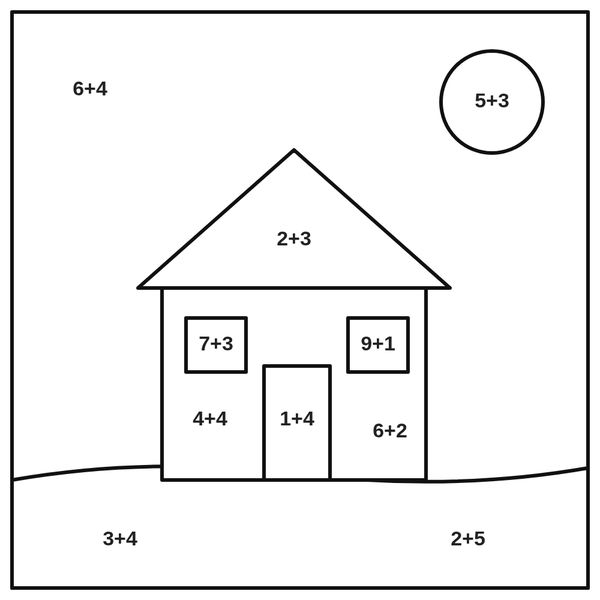
For most children, the second part is easy and enjoyable. For a child who finds handwriting tiring, who struggles to plan their movements, or who tires quickly, it is the other way round: the colouring takes all their energy, and there is not much left for the maths.
The result: the sheet is not finished, or it is finished but rushed, and you can no longer really tell what the child understood.
Separating the two, when it helps
The idea is simple: keep the maths, lighten the colouring. The child still does all the thinking (working out the sum, finding the colour in the key, choosing the area). Only the filling-in becomes automatic.
It is not always the right answer. If the point of the lesson is precisely to work on pencil control or precision, the paper version is still the right one. But if the point is the maths, taking the colouring out lets you see what the child can do, without tiredness muddying everything.
Magic Drawing, a free tool
We have put a small free tool online for exactly this: dysadapt.com/dessin-magique.
How it works:
- Copy the key from the sheet: for each colour, its name and the answer that goes with it (for example "Red = 5", "Yellow = 8").
- Take a photo of the paper sheet, or upload a colouring picture.
- The child works out the sum, picks the colour that matches their answer in the palette, then clicks in the area: it fills in at once.
- Made a mistake? An undo button puts it right. At the end, download the picture to keep it or send it to the teacher.
No account, nothing to install. The photo never leaves your device: everything happens in the browser, and the colouring in progress is kept if you come back to it later on the same device.
They work it out, pick the colour, click:
the area fills in, without the tiring pencil work.
A few tips for a photo that works well
- Lay the sheet completely flat, in good light, with no shadows.
- Frame the picture on its own, without the edge of the table.
- The fill stops at black lines: if a line has a gap on the sheet, the colour "spills" into the next area. Go over the line with a felt-tip pen before taking the photo if needed.
What about other worksheets?
Magic Drawing does one thing only: fill in the areas of a colouring picture. For the rest of the class's work (reading, grammar, word problems…), DysAdapt adapts the whole worksheet to the child's profile (instructions broken into steps, a more spacious layout, their font and spacing), as a printable version or to do on a computer or tablet. See also: Which adaptation for which difficulty?
Key points
- Colour by number is two exercises: doing the maths and colouring in.
- For a child who finds pencil work tiring, the colouring can take all their energy and hide what they can do in maths.
- Filling areas in with a click keeps the maths and removes the tiring pencil work. If the goal is fine motor skills, stick with paper.
- Our free tool turns a photo of the sheet into a colouring picture you fill in with a click.